28 Other Ways to Say “Please Disregard My Previous Email” (With Examples)
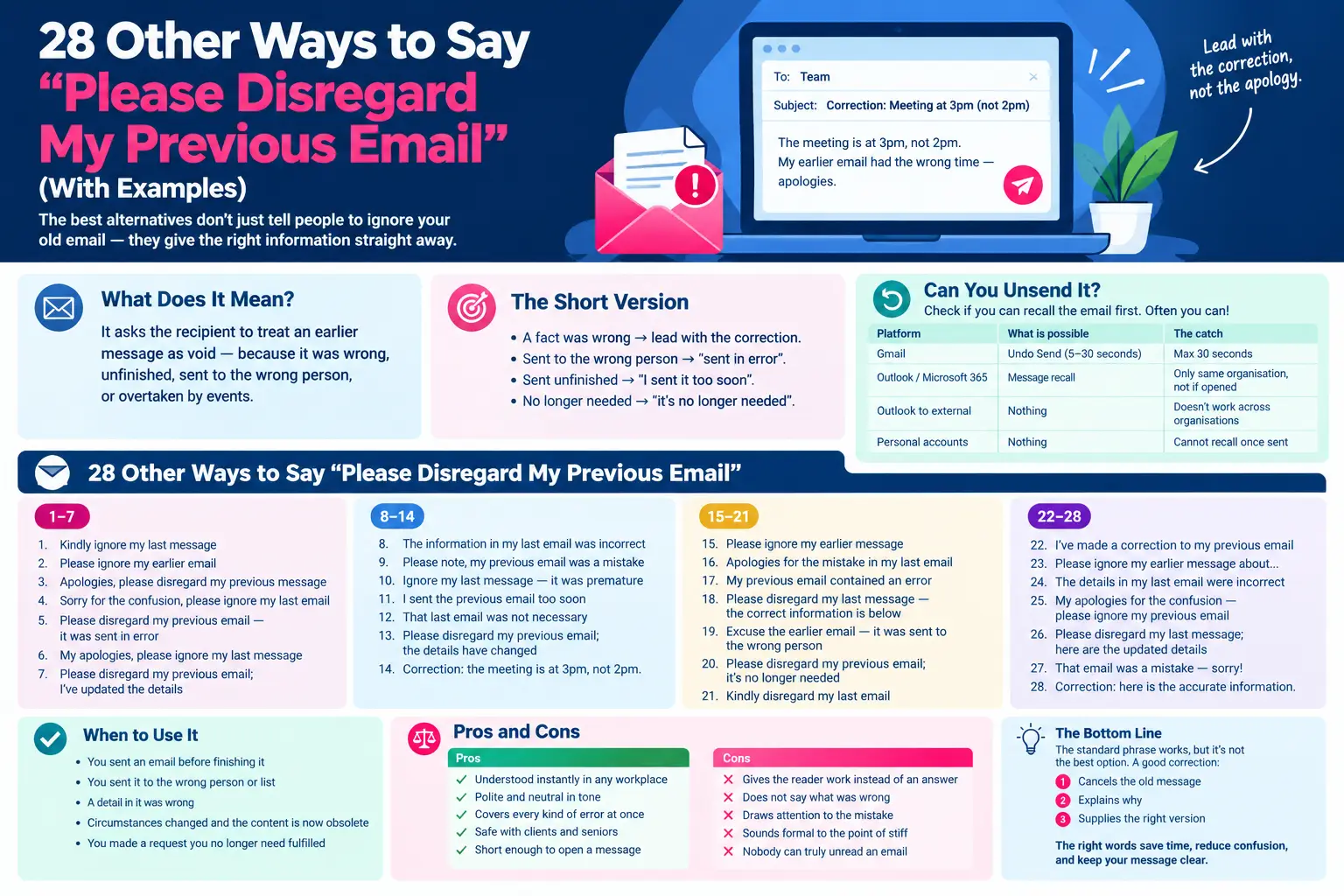
The best other ways to say please disregard my previous email are “please ignore my earlier email”, “sorry for the confusion, please ignore my last email”, “please ignore my previous email, I’ve updated the details” and — better than any of them — leading with the correction itself: “Correction: the meeting is at 3pm, not 2pm.”
Almost every alternative to this phrase is the same instruction with a different adjective. The 28 below are sorted by what each one actually does for the reader, and the best of them do not ask anyone to ignore anything.
What Does “Please Disregard My Previous Email” Mean?
It asks the recipient to treat an earlier message as void — because it was wrong, unfinished, sent to the wrong person, or overtaken by events.
Published writing has a name for this. A correction of a published text is an erratum, with the related corrigendum used when the author rather than the publisher made the error. A correction email is the same act on a smaller scale, and it works best when it follows the same rule: state the correct information, then note what was wrong.
⚡ The Short Version
A fact was wrong → lead with the correction. Sent to the wrong person → “sent in error”. Sent unfinished → “I sent it too soon”. No longer needed → “it’s no longer needed”.
First: Can You Unsend It?
Before you write anything, check whether the email can still be pulled back. Often it can, and then no phrase is needed at all.
| Platform | What is possible | The catch |
|---|---|---|
| Gmail | Undo Send, default 5 seconds, adjustable to 10, 20 or 30 | Thirty seconds is the maximum. After that there is no recall at all |
| Outlook / Microsoft 365 | Message recall | Only if you and the recipient are in the same organisation and they have not opened it |
| Outlook to external addresses | Nothing | Recall does not work across organisations or over the internet |
| Personal accounts | Nothing | Consumer Gmail, Outlook.com and Hotmail cannot recall once sent |
💡 Worth doing once, today: open your Gmail settings and change Undo Send from five seconds to thirty. It is the single cheapest protection against ever needing this article again.
The Better Move: Don’t Ask Them to Ignore Anything
“Please ignore my previous email” gives the reader a task instead of an answer. To act on it they have to find the wrong email, reread it, and work out which part changed.
Leading with the correction removes all of that:
Weak: Please disregard my previous email — apologies for the confusion.
Strong: Correction: the meeting is at 3pm, not 2pm. My earlier email had the wrong time — apologies.
The second version is shorter, and the reader is finished with it in four seconds. Put the correction in the subject line too, and reply inside the original thread so the fix sits directly beneath the error.
When to Use “Please Disregard My Previous Email”
- 🕐 You sent an email before finishing it
- 🕐 You sent it to the wrong person or list
- 🕐 A detail in it was wrong
- 🕐 Circumstances changed and the content is now obsolete
- 🕐 You made a request you no longer need fulfilled
Pros and Cons of “Please Disregard My Previous Email”
| Pros | Cons |
|---|---|
| Understood instantly in any workplace | Gives the reader work instead of an answer |
| Polite and neutral in tone | Does not say what was wrong |
| Covers every kind of error at once | Draws attention to the mistake |
| Safe with clients and seniors | Sounds formal to the point of stiff |
| Short enough to open a message | Nobody can truly unread an email |
Why We Need Better Alternatives
Because the reader has exactly one question — what is true now — and the standard phrase answers a different one.
A correction has three possible jobs: cancel the old message, explain why, and supply the right version. The best wording does all three in one sentence. Most of the phrases below do only the first.
28 Other Ways to Say “Please Disregard My Previous Email”
Each entry leads with real examples, then explains why it works and where it belongs. The What it does line is the one to read: retracting alone is rarely enough.
1. Kindly ignore my last message
Polite bare retraction.
Examples:
- “Kindly ignore my last message — the correct figures are below.”
- “Kindly ignore my last message; it was meant for another thread.”
- “Kindly ignore my last message and refer to this one.”
Why it works: “Kindly” softens the instruction, though it reads as slightly formal or dated to many readers, particularly in American English.
Tone: Formal, polite | Formality: Formal | What it does: Retract only
Best for: Formal and international email | Avoid in: American informal workplaces
2. Please ignore my earlier email
The plainest version.
Examples:
- “Please ignore my earlier email — I’ve attached the right document here.”
- “Please ignore my earlier email about Thursday.”
- “Please ignore my earlier email; this one supersedes it.”
Why it works: It is short, clear and universally understood, which makes it the safe default when you have no time to craft anything better.
Tone: Neutral, direct | Formality: Neutral | What it does: Retract only
Best for: Any professional context | Avoid in: When the reader needs to know what changed
3. Apologies, please disregard my previous message
Retraction with an apology attached.
Examples:
- “Apologies, please disregard my previous message — the date was wrong.”
- “Apologies, please disregard my previous message; I’ve corrected it below.”
- “Apologies, please disregard my previous message to the group.”
Why it works: Leading with the apology suits errors that actually inconvenienced someone. For a typo it makes the mistake sound larger than it was.
Tone: Formal, apologetic | Formality: Formal | What it does: Retract + apology
Best for: Errors that caused real confusion | Avoid in: Trivial corrections
4. Sorry for the confusion, please ignore my last email
Names the effect on the reader.
Examples:
- “Sorry for the confusion, please ignore my last email — the meeting is still at two.”
- “Sorry for the confusion, please ignore my last email about the invoice.”
- “Sorry for the confusion, please ignore my last email; I had the wrong client.”
Why it works: “Sorry for the confusion” acknowledges that the reader’s time was wasted, which is the part a bare retraction skips.
Tone: Warm, apologetic | Formality: Neutral | What it does: Retract + apology
Best for: When the error genuinely confused people | Avoid in: Corrections nobody noticed
5. Please disregard my earlier note
Slightly formal, slightly softer.
Examples:
- “Please disregard my earlier note on the budget.”
- “Please disregard my earlier note — the position has changed.”
- “Please disregard my earlier note; the revised summary follows.”
Why it works: “Note” makes the retracted message sound minor, which usefully lowers the stakes when the error was small.
Tone: Formal, measured | Formality: Formal | What it does: Retract only
Best for: Short internal messages | Avoid in: Formal external correspondence
6. Please ignore the email I just sent
Immediate, conversational.
Examples:
- “Please ignore the email I just sent — wrong attachment.”
- “Please ignore the email I just sent; the right one is on its way.”
- “Please ignore the email I just sent, I hit send too early.”
Why it works: “Just sent” works only within minutes. It is the natural wording when you catch the error immediately and the reader has not opened it yet.
Tone: Casual, immediate | Formality: Casual | What it does: Retract only
Best for: Within minutes of sending | Avoid in: Hours or days later
7. Please disregard the message sent earlier
Impersonal and formal.
Examples:
- “Please disregard the message sent earlier today regarding the tender.”
- “Please disregard the message sent earlier; an updated version follows.”
- “Please disregard the message sent earlier in error.”
Why it works: The passive construction removes you from the sentence, which suits announcements to a large distribution list.
Tone: Formal, impersonal | Formality: Formal | What it does: Retract only
Best for: Mass emails and official notices | Avoid in: One-to-one messages
8. Please ignore my previous note
Short and unfussy.
Examples:
- “Please ignore my previous note — details corrected below.”
- “Please ignore my previous note about the venue.”
- “Please ignore my previous note; I had misread the schedule.”
Why it works: Almost interchangeable with number two, with “note” making the retracted message sound briefer than “email” does.
Tone: Neutral, brief | Formality: Neutral | What it does: Retract only
Best for: Everyday internal email | Avoid in: Formal correspondence
9. My apologies, please ignore the last email
Apology first, formal register.
Examples:
- “My apologies, please ignore the last email — it went out unfinished.”
- “My apologies, please ignore the last email to the whole list.”
- “My apologies, please ignore the last email; the figures were from last quarter.”
Why it works: “My apologies” is a touch lighter than “I apologise”, which keeps a formal correction from sounding like a crisis.
Tone: Formal, apologetic | Formality: Formal | What it does: Retract + apology
Best for: Client and external email | Avoid in: Casual team chat
10. Please ignore my earlier message and refer to this one
Retraction plus a pointer.
Examples:
- “Please ignore my earlier message and refer to this one for the final times.”
- “Please ignore my earlier message and refer to this one instead.”
- “Please ignore my earlier message and refer to this one — everything here is correct.”
Why it works: It tells the reader where to look, which is the minimum a correction should do. A bare retraction leaves them guessing.
Tone: Clear, practical | Formality: Neutral | What it does: Retract + replacement
Best for: When this email contains the fix | Avoid in: When the fix comes later
11. Please disregard my last email as it was sent in error
States the cause plainly.
Examples:
- “Please disregard my last email as it was sent in error — wrong recipient.”
- “Please disregard my last email as it was sent in error; no action is needed.”
- “Please disregard my last email as it was sent in error during testing.”
Why it works: “Sent in error” covers a multitude of causes without detailing any, which is useful when the reason is embarrassing or confidential.
Tone: Formal, neutral | Formality: Formal | What it does: Retract + reason
Best for: Wrong recipients and accidental sends | Avoid in: When the reader needs the real reason
12. Please ignore my previous email, I’ve updated the details
Retraction plus what changed.
Examples:
- “Please ignore my previous email, I’ve updated the details — the venue has moved.”
- “Please ignore my previous email, I’ve updated the details below.”
- “Please ignore my previous email, I’ve updated the details on the second page.”
Why it works: Naming the update saves the reader from comparing two emails to find the difference, which is the most common irritation with corrections.
Tone: Practical, clear | Formality: Neutral | What it does: Retract + replacement
Best for: Changed facts and figures | Avoid in: Emails sent wholly in error
13. Please ignore the earlier email, it’s no longer relevant
Explains that the content is obsolete.
Examples:
- “Please ignore the earlier email, it’s no longer relevant — the client withdrew.”
- “Please ignore the earlier email, it’s no longer relevant to your team.”
- “Please ignore the earlier email, it’s no longer relevant now the date has moved.”
Why it works: It distinguishes obsolete from wrong, which matters: the reader does not need to wonder whether the original was a mistake.
Tone: Neutral, informative | Formality: Neutral | What it does: Retract + reason
Best for: Superseded rather than incorrect email | Avoid in: Genuine errors
14. Please ignore my last message, it was a mistake
Frank admission.
Examples:
- “Please ignore my last message, it was a mistake — wrong thread entirely.”
- “Please ignore my last message, it was a mistake on my part.”
- “Please ignore my last message, it was a mistake; nothing there applies.”
Why it works: Its plainness is disarming. It also invites no follow-up questions, which is often exactly what you want.
Tone: Honest, informal | Formality: Casual | What it does: Retract + reason
Best for: Internal messages and colleagues | Avoid in: Formal client correspondence
15. Please ignore my previous message, I sent it too soon
Explains an unfinished send.
Examples:
- “Please ignore my previous message, I sent it too soon — the full version is below.”
- “Please ignore my previous message, I sent it too soon before adding the figures.”
- “Please ignore my previous message, I sent it too soon by accident.”
Why it works: It is the accurate wording for the commonest email accident of all, and the specificity makes the apology unnecessary.
Tone: Honest, practical | Formality: Neutral | What it does: Retract + reason
Best for: Half-written emails sent early | Avoid in: Content errors
16. Please ignore the previous email and accept my apologies
Formal, two-part.
Examples:
- “Please ignore the previous email and accept my apologies for the confusion.”
- “Please ignore the previous email and accept my apologies — it should not have gone out.”
- “Please ignore the previous email and accept my apologies for the duplicate.”
Why it works: The formality suits clients and senior recipients, though on a small error the double construction can sound heavier than needed.
Tone: Formal, apologetic | Formality: Formal | What it does: Retract + apology
Best for: Client-facing corrections | Avoid in: Minor internal slips
17. Please ignore my earlier email, it was sent accidentally
Names the accident.
Examples:
- “Please ignore my earlier email, it was sent accidentally to this list.”
- “Please ignore my earlier email, it was sent accidentally while I was drafting.”
- “Please ignore my earlier email, it was sent accidentally — apologies for the noise.”
Why it works: “Accidentally” reassures the reader that nothing in the original was intended for them, which stops them reading it closely for meaning.
Tone: Neutral, reassuring | Formality: Neutral | What it does: Retract + reason
Best for: Misdirected and accidental sends | Avoid in: Substantive content errors
18. Kindly disregard the previous communication
The most formal option here.
Examples:
- “Kindly disregard the previous communication regarding the audit.”
- “Kindly disregard the previous communication issued this morning.”
- “Kindly disregard the previous communication; a corrected notice follows.”
Why it works: “Communication” belongs to official and legal writing. In ordinary email it reads as stiff to the point of coldness.
Tone: Very formal, official | Formality: Formal | What it does: Retract only
Best for: Legal, regulatory and official notices | Avoid in: Everyday professional email
19. Please ignore my last note, it’s outdated now
Frames it as superseded by events.
Examples:
- “Please ignore my last note, it’s outdated now the board has decided.”
- “Please ignore my last note, it’s outdated now — new numbers below.”
- “Please ignore my last note, it’s outdated now that the deadline moved.”
Why it works: “Outdated” shifts responsibility to the passage of time rather than to your carelessness, which is honest when circumstances changed.
Tone: Neutral, factual | Formality: Neutral | What it does: Retract + reason
Best for: Superseded information | Avoid in: Your own mistakes
20. Please disregard my previous message and accept the updated version
Retraction plus replacement.
Examples:
- “Please disregard my previous message and accept the updated version attached.”
- “Please disregard my previous message and accept the updated version below.”
- “Please disregard my previous message and accept the updated version as final.”
Why it works: It pairs the retraction with the replacement in one sentence, so the reader never has to ask which version to use.
Tone: Formal, complete | Formality: Formal | What it does: Retract + replacement
Best for: Documents and formal attachments | Avoid in: Quick informal notes
21. Please ignore my earlier email, I’ve corrected the mistake
Confirms the fix is done.
Examples:
- “Please ignore my earlier email, I’ve corrected the mistake in the attached.”
- “Please ignore my earlier email, I’ve corrected the mistake on the invoice.”
- “Please ignore my earlier email, I’ve corrected the mistake and resent it.”
Why it works: Saying the fix is complete removes the reader’s last worry, which is whether they need to chase you for a corrected version.
Tone: Practical, reassuring | Formality: Neutral | What it does: Retract + replacement
Best for: After you have already fixed it | Avoid in: Before the fix exists
22. Please ignore the email I sent earlier today
Time-stamped retraction.
Examples:
- “Please ignore the email I sent earlier today about the schedule.”
- “Please ignore the email I sent earlier today — disregard the attachment too.”
- “Please ignore the email I sent earlier today; this version is correct.”
Why it works: The time reference is genuinely useful in a busy thread, where “my previous email” could mean any of four messages.
Tone: Neutral, specific | Formality: Neutral | What it does: Retract only
Best for: Busy threads with several messages | Avoid in: Single-message exchanges
23. Please disregard my earlier message, it’s no longer needed
Says no action is required.
Examples:
- “Please disregard my earlier message, it’s no longer needed — the issue resolved itself.”
- “Please disregard my earlier message, it’s no longer needed; I found the file.”
- “Please disregard my earlier message, it’s no longer needed now that Ravi has replied.”
Why it works: It cancels a request rather than correcting a fact, which is the right wording when you asked for something and then no longer needed it.
Tone: Considerate, clear | Formality: Neutral | What it does: Retract + reason
Best for: Cancelling a request you made | Avoid in: Correcting wrong information
24. Please ignore my previous email and accept my correction
Formal retraction with a fix.
Examples:
- “Please ignore my previous email and accept my correction below.”
- “Please ignore my previous email and accept my correction to the total.”
- “Please ignore my previous email and accept my correction — the second clause was wrong.”
Why it works: “Correction” signals that a specific fact changed rather than the whole message being void, which helps the reader calibrate.
Tone: Formal, precise | Formality: Formal | What it does: Retract + replacement
Best for: Formal corrections of record | Avoid in: Wholly misdirected emails
25. Kindly ignore the previous email, thank you for understanding
Retraction closed with thanks.
Examples:
- “Kindly ignore the previous email, thank you for understanding.”
- “Kindly ignore the previous email, thank you for understanding — corrected notice below.”
- “Kindly ignore the previous email, thank you for understanding the mix-up.”
Why it works: Closing with thanks rather than apology is slightly warmer, and it works well in messages to a large group.
Tone: Formal, gracious | Formality: Formal | What it does: Retract + apology
Best for: Group announcements | Avoid in: Close colleagues, where it sounds stiff
26. Correction: the meeting is at 3pm, not 2pm
Leads with the fix, not the retraction.
Examples:
- “Correction: the meeting is at 3pm, not 2pm. Apologies for the earlier email.”
- “Correction: the invoice total is £4,200, not £2,400.”
- “Correction: the deadline is Friday the 14th. My earlier email said Thursday.”
Why it works: Every phrase above sends the reader back to the wrong email to work out what changed. This one puts the right answer first and mentions the error second, which is how published corrections have always worked.
Tone: Direct, efficient | Formality: Neutral | What it does: Leads with the fix
Best for: Any factual correction | Avoid in: Emails sent wholly in error
27. Please disregard the attachment only — the correct file is attached here
Retracts part, not all.
Examples:
- “Please disregard the attachment only — the correct file is attached here.”
- “Please disregard the attachment only; everything in the email body still stands.”
- “Please disregard the attachment only — the rest of the message is accurate.”
Why it works: Their list retracts whole emails. Most real errors are partial, and telling the reader which part still stands saves them re-reading the whole thing.
Tone: Precise, practical | Formality: Neutral | What it does: Partial retraction
Best for: Wrong attachments and single errors | Avoid in: Emails wrong throughout
28. Please use the version below instead
Forward-facing, no apology or blame.
Examples:
- “Please use the version below instead — it supersedes anything sent this morning.”
- “Please use the version below instead of the attached schedule.”
- “Please use the version below instead; it is the one signed off by finance.”
Why it works: It skips retraction and apology entirely and simply directs the reader to the right thing. For routine version changes that is all anyone needs.
Tone: Neutral, businesslike | Formality: Neutral | What it does: Leads with the fix
Best for: Routine version updates | Avoid in: Errors that caused real confusion
Detailed Comparison Table
All 28 alternatives, with formality, tone, what each one actually does, and where it belongs.
| Phrase | Formality | Tone | What it does | Best for | Avoid in |
|---|---|---|---|---|---|
| Kindly ignore my last message | Formal | Formal, polite | Retract only | Formal and international email | American informal workplaces |
| Please ignore my earlier email | Neutral | Neutral, direct | Retract only | Any professional context | When the reader needs to know what changed |
| Apologies, please disregard my previous message | Formal | Formal, apologetic | Retract + apology | Errors that caused real confusion | Trivial corrections |
| Sorry for the confusion, please ignore my last email | Neutral | Warm, apologetic | Retract + apology | When the error genuinely confused people | Corrections nobody noticed |
| Please disregard my earlier note | Formal | Formal, measured | Retract only | Short internal messages | Formal external correspondence |
| Please ignore the email I just sent | Casual | Casual, immediate | Retract only | Within minutes of sending | Hours or days later |
| Please disregard the message sent earlier | Formal | Formal, impersonal | Retract only | Mass emails and official notices | One-to-one messages |
| Please ignore my previous note | Neutral | Neutral, brief | Retract only | Everyday internal email | Formal correspondence |
| My apologies, please ignore the last email | Formal | Formal, apologetic | Retract + apology | Client and external email | Casual team chat |
| Please ignore my earlier message and refer to this one | Neutral | Clear, practical | Retract + replacement | When this email contains the fix | When the fix comes later |
| Please disregard my last email as it was sent in error | Formal | Formal, neutral | Retract + reason | Wrong recipients and accidental sends | When the reader needs the real reason |
| Please ignore my previous email, I’ve updated the details | Neutral | Practical, clear | Retract + replacement | Changed facts and figures | Emails sent wholly in error |
| Please ignore the earlier email, it’s no longer relevant | Neutral | Neutral, informative | Retract + reason | Superseded rather than incorrect email | Genuine errors |
| Please ignore my last message, it was a mistake | Casual | Honest, informal | Retract + reason | Internal messages and colleagues | Formal client correspondence |
| Please ignore my previous message, I sent it too soon | Neutral | Honest, practical | Retract + reason | Half-written emails sent early | Content errors |
| Please ignore the previous email and accept my apologies | Formal | Formal, apologetic | Retract + apology | Client-facing corrections | Minor internal slips |
| Please ignore my earlier email, it was sent accidentally | Neutral | Neutral, reassuring | Retract + reason | Misdirected and accidental sends | Substantive content errors |
| Kindly disregard the previous communication | Formal | Very formal, official | Retract only | Legal, regulatory and official notices | Everyday professional email |
| Please ignore my last note, it’s outdated now | Neutral | Neutral, factual | Retract + reason | Superseded information | Your own mistakes |
| Please disregard my previous message and accept the updated version | Formal | Formal, complete | Retract + replacement | Documents and formal attachments | Quick informal notes |
| Please ignore my earlier email, I’ve corrected the mistake | Neutral | Practical, reassuring | Retract + replacement | After you have already fixed it | Before the fix exists |
| Please ignore the email I sent earlier today | Neutral | Neutral, specific | Retract only | Busy threads with several messages | Single-message exchanges |
| Please disregard my earlier message, it’s no longer needed | Neutral | Considerate, clear | Retract + reason | Cancelling a request you made | Correcting wrong information |
| Please ignore my previous email and accept my correction | Formal | Formal, precise | Retract + replacement | Formal corrections of record | Wholly misdirected emails |
| Kindly ignore the previous email, thank you for understanding | Formal | Formal, gracious | Retract + apology | Group announcements | Close colleagues, where it sounds stiff |
| Correction: the meeting is at 3pm, not 2pm | Neutral | Direct, efficient | Leads with the fix | Any factual correction | Emails sent wholly in error |
| Please disregard the attachment only — the correct file is attached here | Neutral | Precise, practical | Partial retraction | Wrong attachments and single errors | Emails wrong throughout |
| Please use the version below instead | Neutral | Neutral, businesslike | Leads with the fix | Routine version updates | Errors that caused real confusion |
The fourth column exposes the whole problem. 8 of these 28 retract and stop, leaving the reader to work out what changed. Seven add a reason, five add an apology, five point to the replacement, one retracts a single part rather than the whole message, and only two lead with the correction itself — which is the version that actually saves anyone time.
Which One Fits Your Situation?
Was a Fact Wrong?
Lead with the fix: Correction: the meeting is at 3pm, not 2pm. Do not make the reader hunt for the difference.
Did It Go to the Wrong People?
Use please disregard my last email as it was sent in error or it was sent accidentally. Both reassure the reader that nothing in it concerned them, which stops them reading it closely.
Did You Send It Half-Finished?
Please ignore my previous message, I sent it too soon. It is accurate, it explains everything, and it needs no apology.
Was Only Part of It Wrong?
Please disregard the attachment only — the correct file is attached here. Telling the reader what still stands is as useful as telling them what does not.
Do You Simply No Longer Need It?
Please disregard my earlier message, it’s no longer needed. Cancelling a request is different from correcting a fact, and the wording should say so.
⚠️ Four Things to Avoid
Retracting Without Saying What Changed
“Ignore my last email” and nothing else guarantees a reply asking what was wrong. One clause prevents it.
Over-Apologising
A wrong time in an internal email needs a correction, not three sentences of contrition. Heavy apology for a small slip makes the slip look bigger and you look rattled.
Widening the Audience
Send the correction to exactly the people who got the original — never more. Copying extra recipients to explain a mistake broadcasts it to people who never saw it.
Starting a New Thread
Reply inside the original thread. A correction in a separate email can be read before, after, or instead of the thing it corrects.
Formal to Casual: The Full Scale
| Register | Phrases | Send to |
|---|---|---|
| Most formal | Kindly disregard the previous communication, Please disregard the message sent earlier, Please ignore the previous email and accept my apologies | Legal, regulatory, official notices |
| Formal | Apologies, please disregard my previous message, My apologies please ignore the last email, Please disregard my previous message and accept the updated version | Clients and senior contacts |
| Neutral | Please ignore my earlier email, Correction: the meeting is at 3pm not 2pm, Please use the version below instead, Please ignore my previous email I’ve updated the details | Most professional email |
| Everyday | Please ignore my previous message I sent it too soon, Please disregard the attachment only, Please ignore my last note it’s outdated now | Colleagues |
| Casual | Please ignore the email I just sent, Please ignore my last message it was a mistake | Your team |
Key Points to Remember
- The phrase asks a recipient to treat an earlier email as void.
- A correction to published text is an erratum — and the same rule applies: state what is true first.
- Gmail allows up to 30 seconds of Undo Send; change the default five now.
- Outlook recall works only inside one organisation, on unopened mail.
- Nothing can recall email sent to an external or personal address.
- 8 of these 28 phrases retract without saying what changed.
- Leading with the correction is faster for the reader than any retraction.
- Say which part was wrong when only part of it was.
- Reply in the original thread, and never widen the recipient list.
- Match the apology to the size of the error.
The Bottom Line
Looking for other ways to say please disregard my previous email is a sign you have just sent something you wish you had not. Check first whether you can unsend it — within thirty seconds in Gmail, or inside your own organisation in Outlook, no words are needed at all.
If the email has landed, resist the instinct to apologise and retract. Say what is true, say briefly what was wrong, and reply in the same thread so the correction sits beside the error. A reader who knows the meeting is at three has everything they need — much as a reply that states what you did with the information beats one that merely acknowledges it. And if the mistake cost someone time, one clear apology is worth more than three hedged ones.
Frequently Asked Questions
Why should I avoid using “please disregard my previous email”?
Because it gives the reader a task rather than an answer. To act on it they must find the old email, reread it and work out what changed. Leading with the correction — “Correction: the meeting is at 3pm, not 2pm” — does the job in one line.
What is the best way to correct an email mistake?
Reply inside the original thread, put the correction in the first line and ideally the subject, say in one clause what was wrong, and send it only to the people who received the original.
Can I unsend an email instead?
Sometimes. Gmail’s Undo Send gives you five seconds by default and up to thirty if you change the setting. Outlook can recall a message only when you and the recipient are in the same organisation and they have not opened it. Nothing recalls mail sent to external or personal addresses.
Can I use casual language in business emails?
With colleagues, yes — “please ignore the email I just sent” is perfectly normal internally. For clients and senior contacts use the fuller forms such as “my apologies, please ignore the last email”.
When should I send a correction email?
As soon as the error would change what someone does — a wrong time, price, date, name or attachment. If the mistake is cosmetic and changes nothing, a correction simply doubles the number of emails people have to read.
Should I apologise for sending the wrong email?
Match the apology to the cost. A wrong time in an internal message needs a brief correction, not contrition. If the error genuinely wasted someone’s time, one clear apology is enough; repeating it makes the mistake look bigger.
What if only part of the email was wrong?
Say so: “please disregard the attachment only — the correct file is attached here”. Telling the reader what still stands saves them rereading the whole message.
Do alternatives really make a difference?
Yes, though not because of the wording itself. What helps the reader is the information around it — what changed, what is correct now, and whether they need to do anything. A phrase that carries none of that is interchangeable with any other.